WordPress Media File Disclosure via Open Registration
Leveraging open WordPress user registration on a corporate subdomain to access internal media files through the WP REST API, exposing confidential corporate presentations and documents.
WordPress Media File Disclosure via Open Registration
Overview
During routine reconnaissance on a target's assets, I discovered that a subdomain — a WordPress-powered site used for corporate events — had user registration publicly enabled. By creating a subscriber-level account, I was able to query the WordPress REST API and retrieve a full listing of all media files hosted on the subdomain, including confidential partnership presentations, internal corporate slide decks, and other proprietary documents that were never intended for public access.
Vulnerability Type: Information Disclosure / Broken Access Control
Affected Asset:move.target.com
Severity: Medium
Status: Disclosed, Fixed, and bounty rewarded.
Reconnaissance
While enumerating the target's subdomains, move.target.com stood out as a WordPress instance used for the company's corporate logistics events. Standard WordPress fingerprinting confirmed the CMS and revealed default endpoints were accessible.
The key finding during recon was that the WordPress registration endpoint was publicly accessible:
https://move.target.com/wp-login.php?action=register
This is a significant misconfiguration — on a corporate subdomain, user registration should either be disabled entirely or restricted to approved domains/invitations.
Steps to Reproduce
Step 1: Discover Open Registration
Navigate to the WordPress login page and check for the registration link. The registration form was fully functional at:
https://move.target.com/wp-login.php?action=register
The form only required a username and email address. A registration confirmation was sent immediately via email.
Step 2: Register an Account & Confirm via Email
After submitting the registration form, two emails arrived from the target:
- Login Details — containing the username and a password-set link
- Password Reset — a standard WordPress password reset email
I set a password using the provided link and logged in successfully as a subscriber-level user.
Step 3: Authenticate and Confirm Session
After logging in, I had a valid authenticated session on move.target.com. The browser DevTools confirmed active WordPress session cookies:
The session cookies (wordpress_logged_in_*, PHPSESSID) confirmed full authentication as a registered user.
Step 4: Access the WordPress REST API Media Endpoint
With an authenticated session, I navigated to the WordPress REST API media endpoint:
https://move.target.com/wp-json/wp/v2/media
This endpoint returned a JSON array containing metadata for all uploaded media files, including:
- File URLs (direct download links)
- Upload dates
- File titles and descriptions
- MIME types
- Dimensions and file sizes
Step 5: Access Confidential Media Files
The disclosed media files included confidential corporate documents that were only meant for internal use. Among the exposed files were:
Partner Presentation — a confidential slide deck containing roadmap updates and strategic partnership details, marked with a confidentiality disclaimer:
Internal Event Presentations — including slide decks for internal corporate events, such as a 78-page presentation by the company's Content & Communication Manager:
All files were accessible via direct URLs under:
https://move.target.com/wp-content/uploads/*.pdf
Impact
This vulnerability allowed any internet user to:
- Create an account on a corporate WordPress subdomain with zero verification
- Enumerate all uploaded media via the unauthenticated/subscriber-accessible REST API
- Download confidential documents including partnership materials, internal presentations, and proprietary business content
The exposed documents contained confidential business strategies, product roadmaps, and partner agreements that could be leveraged by competitors or malicious actors.
Remediation Recommendations
| # | Recommendation |
|---|---|
| 1 | Disable public registration on corporate WordPress instances |
| 2 | Restrict REST API access — block /wp-json/wp/v2/media for unauthenticated or low-privilege users |
| 3 | Audit uploaded media — ensure no sensitive documents are stored on publicly-facing WordPress instances |
| 4 | Implement role-based access controls — media files should require appropriate permissions to view |
| 5 | Use a CDN or separate storage for sensitive documents with proper access controls |
Tools Used
- Burp Suite
- Firefox (with DevTools)
- Manual browsing & enumeration
- WordPress REST API
Timeline
| Date | Event |
|---|---|
| Feb 13, 2025 | Vulnerability discovered and reported |
| — | Vendor acknowledged and patched |
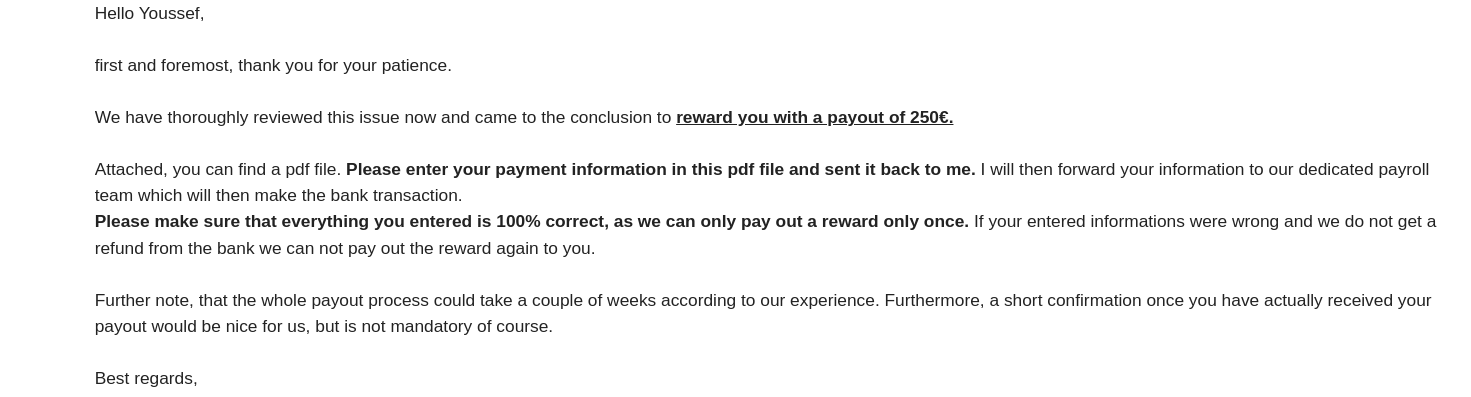 Vendor confirmation of bounty reward for the disclosed vulnerability
Key Takeaways
- Default WordPress configurations are dangerous — features like open registration and unrestricted REST API access should always be hardened on production deployments
- The WordPress REST API (
/wp-json/wp/v2/media) is a goldmine during recon — always check if it leaks media metadata - Even subscriber-level accounts (the lowest WordPress role) can access sensitive API endpoints if not explicitly restricted
- Corporate subdomains running WordPress are frequently overlooked during security hardening, making them prime targets